2026-09-05 · 5 min read
Curriculum topics — one catalog lesson for every CEFR step
Browse a ready-made catalog of levelled topics (A1–C2). Each topic is one lesson with a can-do goal and grammar to practise—pick it when creating a lesson or speaking room, and track coverage per student.
What are curriculum topics?
Curriculum topics are Lesso’s shared teaching catalog: sequenced, CEFR-aligned lessons for each language and level (A1 through C2). Think of them as a syllabus you can open anytime—not a blank prompt box.
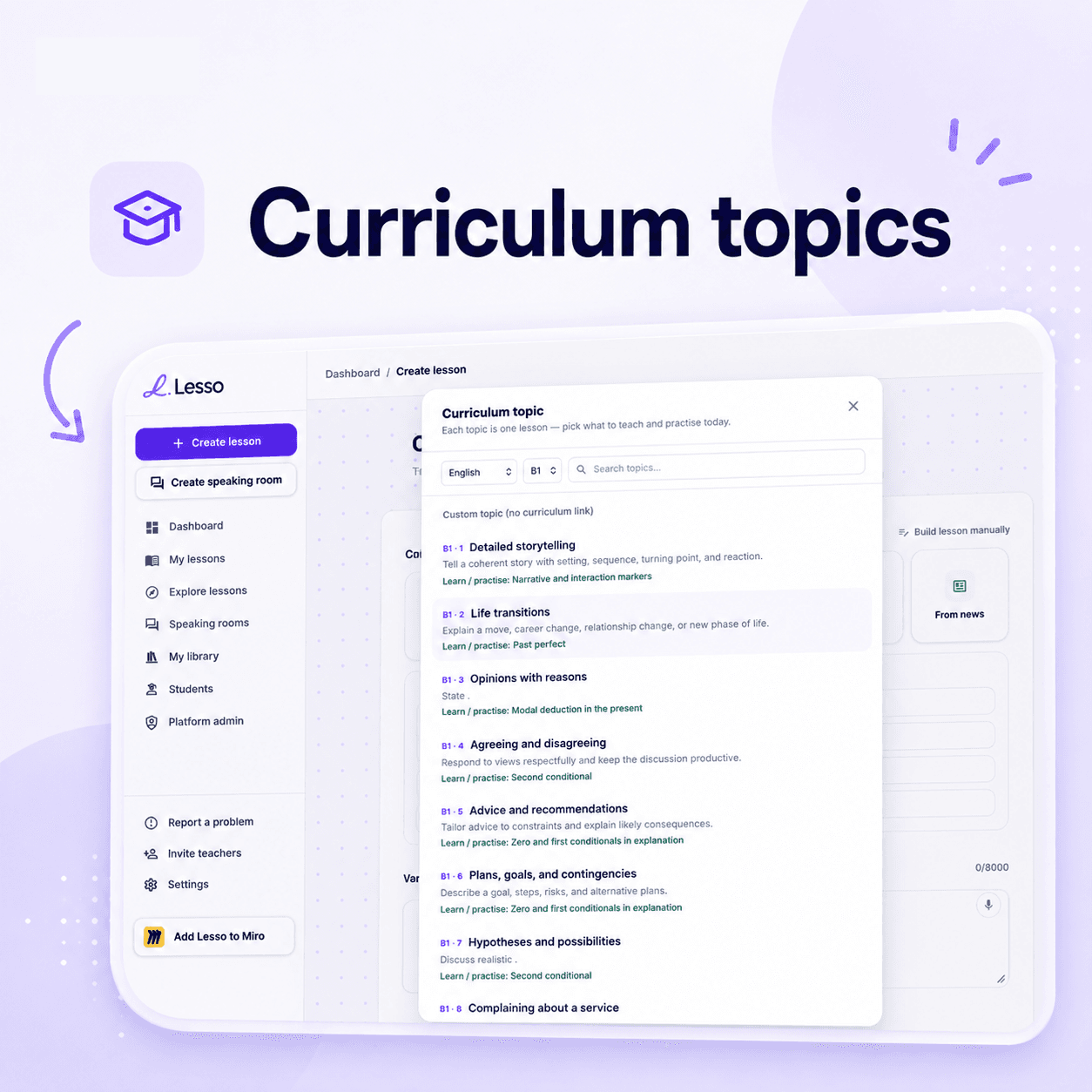
Each topic is designed as one lesson. You get a clear title (for example B1 · Detailed storytelling), a can-do goal students should achieve, and a Learn / practise focus that names the grammar or functional language to teach.
The same catalog powers teacher planning and student learning paths, so what you teach in class can stay aligned with what self-study students cover week by week.
Where to find them
Create lesson — On the create-lesson screen, open Quick start and tap Curriculum topic. A modal lets you filter by language and CEFR level, search by keyword, and pick a topic.
Speaking rooms — When creating a teacher Talk room, you can also attach a curriculum topic so the situation and language goals stay tied to the syllabus.
Student profile — On a student’s page, Curriculum coverage shows which catalog topics they have already covered via learning path, your lessons, or speaking rooms—handy when choosing what to teach next.
How it works
Filter — Choose the target language and level (for example English · B1). Optionally search for words like storytelling, advice, or conditional.
Browse — Each row shows the topic number and title, the can-do goal, and the Learn / practise line (the grammar or skill focus).
Select — Confirm a topic. Lesso turns it into a lesson brief: one lesson covering that catalog item, with the can-do and grammar rule woven into generation.
Generate — Continue with structure generation as usual. AI builds blocks around that topic; you can still edit the prompt, reorder blocks, or regenerate.
Custom topic — Prefer a free brief with no catalog link? Use Custom topic (no curriculum link) in the picker, or write your own prompt without opening the catalog.
How to use it in your workflow
Course planning — Walk a class through numbered B1 lessons in order, or jump to a gap you spotted in coverage.
Follow a student — Check Curriculum coverage on their profile, then Create lesson → Curriculum topic for the next uncovered item at their level.
Speaking practice — Seed a Talk room from the same topic so oral practice matches the grammar you taught in the lesson.
Learning paths — Self-study paths already blend these catalog topics; teacher-assigned lessons on the same IDs keep classroom and solo study coherent.
Why teachers will like it
Less blank-page anxiety—you start from a named goal and grammar point instead of inventing everything from scratch.
Clear sequencing across a level (about thirty lessons per CEFR band per language) without locking you into a rigid coursebook.
Shared language between you, AI generation, and the student’s path: one topic ID, one lesson focus.
Try it on your next lesson
Go to Create lesson → Quick start → Curriculum topic. Set language and level, pick a topic that matches this week’s need, then generate the outline.
After class, open the student’s profile to confirm the topic shows under Curriculum coverage—or choose the next numbered lesson for continuity.